It is official: as of July 15, 2026, TV Time has gone dark. It was pulled from the App Store and Google Play, tvtime.com is offline, and here is the part that matters most: every account and everything in it is being deleted. Ten years of episodes, your watchlist, your ratings, all of it.
Parent company Whip Media is refocusing on enterprise AI, and the free app did not survive the shift. That is a real loss. For a lot of people, TV Time was the way they kept a life's worth of TV in one place. We are not here to dance on it. We are here to help you rescue whatever you saved, and to show you a home that works the way you are used to. Hobi is the official migration partner for TV Time users, and this is the full move, start to finish.
There are two things left to do, in this order.
Step 1: Find your TV Time export file
Here is the hard part first: TV Time shut down on July 15, 2026, and its data export portal is now offline, so you can no longer request a fresh export. Everything now comes down to whether you saved your export file before the shutdown.
- If you saved your export (the GDPR ZIP), you are in good shape. That file is your entire TV Time history, and it keeps working forever. Track it down wherever you downloaded it and treat it like the backup it is. Hobi's importer reads it directly, ratings and all (more on that below).
- If you did not export in time, the data on TV Time's servers cannot be recovered, and we are sorry. You can still start fresh in Hobi, and if you also used Trakt, anything you synced there can come across instead.
Step 2: Pick a home that works the way TV Time did
The threads are full of people trying five apps in a weekend and bouncing off every one. After reading a lot of those, the checklist people actually care about is short. Here is what to look for, and where Hobi lands on each. If you want the short version, we broke it down in the best TV Time alternative in 2026.
- Fast episode marking. The thing TV Time nailed: a scrollable list where each show surfaces its next episode and you check it off in one tap, with no digging through menus. This is what decides it for most people. Hobi's watchlist gives every show a View Next button and one tap to mark an episode watched, built to be quick.
- Real show statuses. Watching, On hold, Dropped, Plan to watch, so a paused show leaves your calendar without erasing your history. Hobi keeps these, which is exactly what people miss when they try trackers that drop them.
- A calendar and reminders. Half of losing track is not knowing when a show comes back. Hobi counts down to every next episode and season premiere, and notifies you for the shows you choose.
- Your ratings, kept. The rating you gave each episode was part of how you remembered a show. Hobi tracks them too, which is worth knowing, because some popular migration paths quietly drop your ratings on the way in.
- Your history, yours. The lesson of this whole week is simple: a tracker you cannot back up is a tracker you can lose. Hobi works with Trakt, an open and exportable standard, so your data is never trapped again.
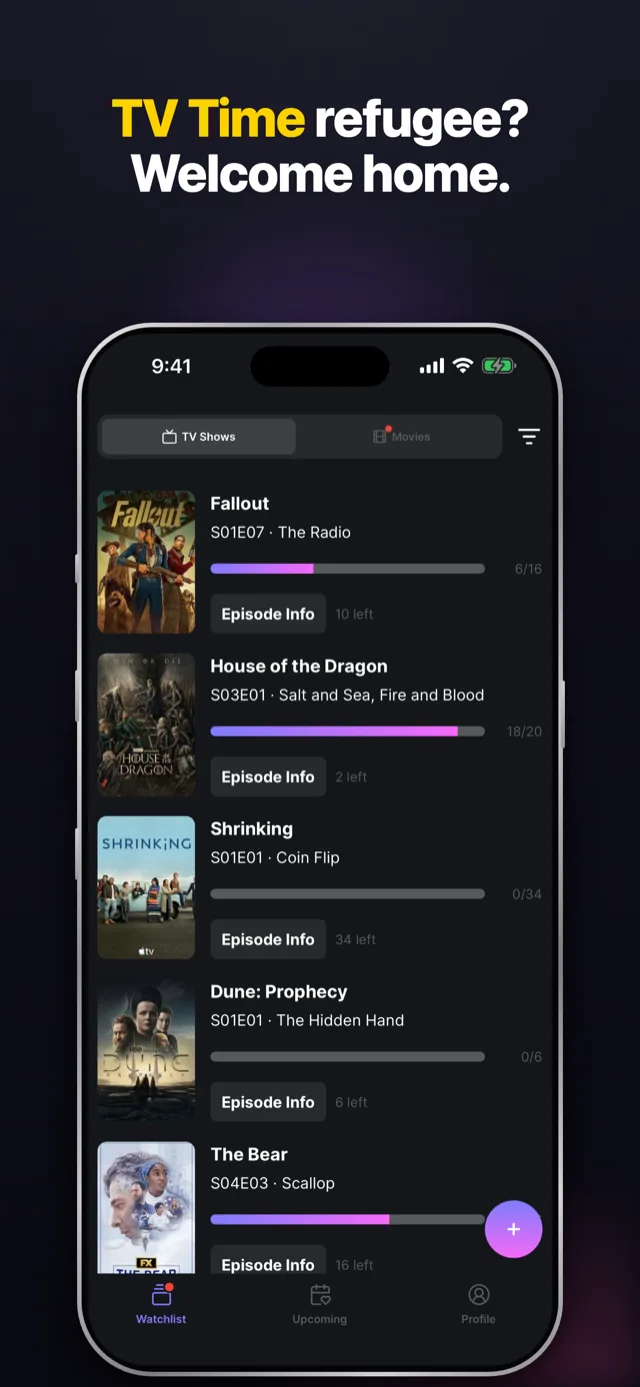
Step 3: Bring your shows into Hobi
Download Hobi on iOS or Android, then bring your history across one of two ways.
- The direct TV Time import, live now. Hobi's importer reads your official TV Time export (the GDPR ZIP) as is, automatically matches your shows and movies, and transfers your viewing history, watchlist and ratings in one go. It is exactly why Step 1 matters: that export file is everything, and it keeps working even after the shutdown, so importing next month works as well as importing today. Per-episode ratings are coming soon. Start at hobiapp.com/tv-time.
- Trakt sync, also working. Already living in Trakt? Connect it in Hobi's settings and Hobi pulls everything in and keeps both libraries in step from then on. See our Trakt sync guide. One heads up: Trakt's TV Time importer does not carry your ratings across, so our own import is the way to keep those.
Either way, once your shows are in, set your statuses, turn on reminders for the ones you would drop everything for, and you are back to tracking, with no spreadsheet in between.
If you are a power user with a decade of history, that is exactly who we build for: bulk marking, rewatch logging, and correct chronological ordering for the shows that need it. Hobi is not trying to be a different app than the one you loved. It is trying to be what a great tracker should be in 2026.
Got your export saved? Bring your shows home to Hobi, free on iOS and Android.
Want the short, step by step version? See move your TV Time history to Hobi and does Hobi keep your ratings in the help center.