If you have spent any time in tracking communities, you know Trakt. It has been the backbone of TV and movie tracking for years: an open platform, a real API, scrobbling from Plex and Kodi and Jellyfin, and a data format almost every other app can read. We like Trakt so much that Hobi syncs with it. So this is not a takedown. It is a straight answer to a fair question: for actually tracking your shows day to day, should you use Trakt or Hobi?
The short version: Trakt is a fantastic backend. Hobi is a better front end. And because Hobi keeps two way sync with Trakt, the smartest setup is often both.
The short version
| Hobi | Trakt | |
|---|---|---|
| Fast one tap episode marking | Built around it | Works, but the official app is basic |
| Show statuses (Watching, On hold, Dropped, Plan to watch) | Yes | Limited |
| Release calendar and reminders | Built in, per show | Calendar yes, push reminders vary by app |
| Keeps your ratings when importing from TV Time | The whole point | Importer brings history, not ratings |
| Scrobbling from Plex, Kodi, Jellyfin | Not the focus | Yes, this is Trakt's strength |
| Open data you can export | Via Trakt sync | Yes, the open standard |
| Movies and TV in one place | Yes | Yes |
| Price | Free to track | Free tier, VIP for some features |
Where Trakt shines
Credit where it is due. Trakt is the open standard for a reason. If you want your viewing to scrobble automatically from a media server, Trakt is the answer, and Hobi does not try to be. Its API means your data can move between dozens of apps, which is exactly the kind of portability that matters after a week like this one, when a closed app can take your whole history with it. If you are a tinkerer who wants a data hub more than a polished app, Trakt is genuinely great.
Where Hobi pulls ahead
Here is the thing most people find out after a few days: Trakt is wonderful infrastructure, but the official Trakt app is deliberately simple, and the day to day act of tracking is where you spend all your time. That is what Hobi is built for.
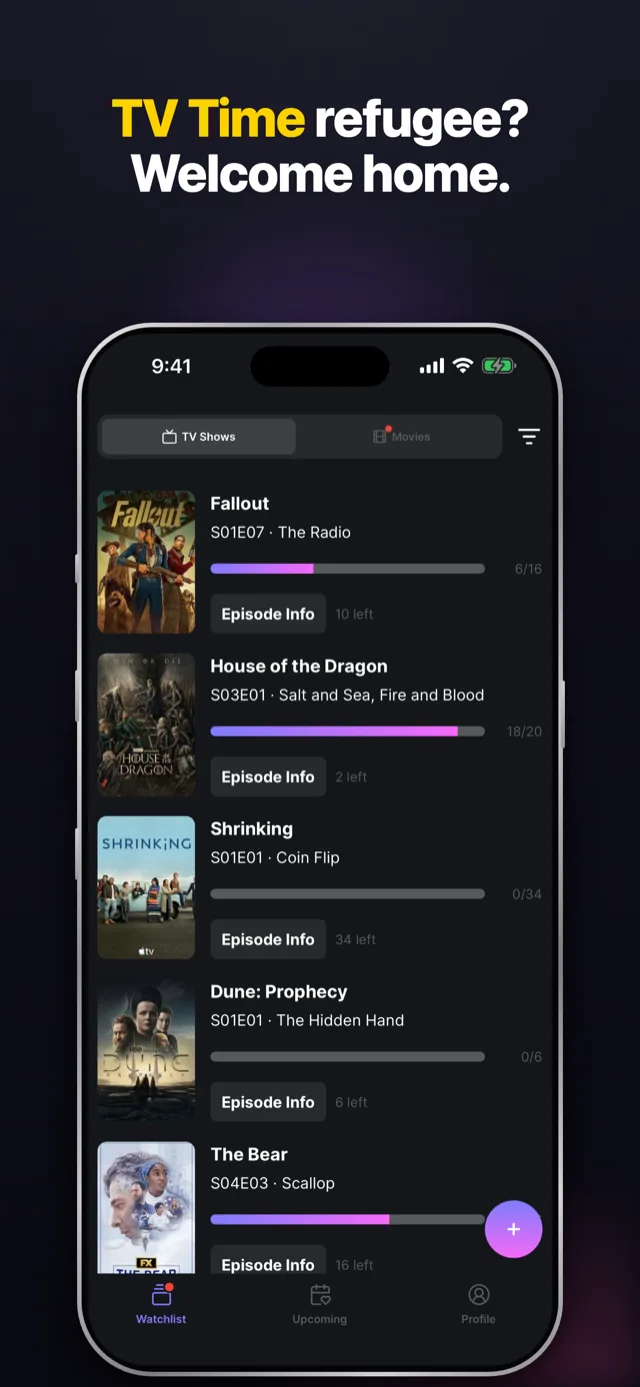
- Marking episodes is instant. Hobi's watchlist gives every show a View Next button and one tap to mark an episode watched. No digging through a show, then a season, then an episode. For people coming from TV Time, this is the muscle memory you are missing.
- Real show statuses. Watching, On hold, Dropped, Plan to watch. A paused show leaves your calendar without erasing your history. This is one of the first things people notice is missing when they move to a bare Trakt setup.
- A calendar and reminders that fire. Hobi counts down to every next episode and season premiere and notifies you for the shows you choose, right out of the box, with nothing to wire up.
- Your ratings, kept. This is the big one for TV Time refugees. Trakt's TV Time importer brings your watched history and watchlist, but not your episode ratings. Hobi, the official migration partner for TV Time users, keeps them: upload your export ZIP as is and your ratings come across with everything else. Start at hobiapp.com/tv-time.
You do not actually have to choose
This is the part people miss. Hobi keeps two way sync with Trakt, so you can use Trakt as your open, portable data hub and use Hobi as the app you actually open every day. Mark an episode in Hobi and it shows up in Trakt. Scrobble something to Trakt and it lands in Hobi. Connect it once in Hobi's settings and your library stays in step from then on. Our Trakt sync guide walks through the whole thing in under a minute.
So which one?
If you live inside a media server and want automatic scrobbling above all else, lead with Trakt. If you want the fast, friendly, notify me when it airs experience that TV Time people are looking for, use Hobi. And if you want the best of both, run Hobi on top of Trakt. That is how a lot of our happiest users are set up.
One thing worth knowing if you are choosing this year: Trakt has had a bumpy 2026 with its own community. It rolled out a V3 redesign that a vocal part of its forum has pushed back on, and it raised annual VIP pricing. None of that changes how capable the underlying service is, but if a calm, stable, mobile-first app matters to you right now, it is part of the picture. Hobi's job is to stay the app you open every day, and to keep your data portable so you are never stuck with any one choice.
Moving from TV Time? Read our guide to moving your saved history to Hobi, then get Hobi free on iOS and Android.